What the customer and the business each see
Screens taken from a demo site; the data is fictional.
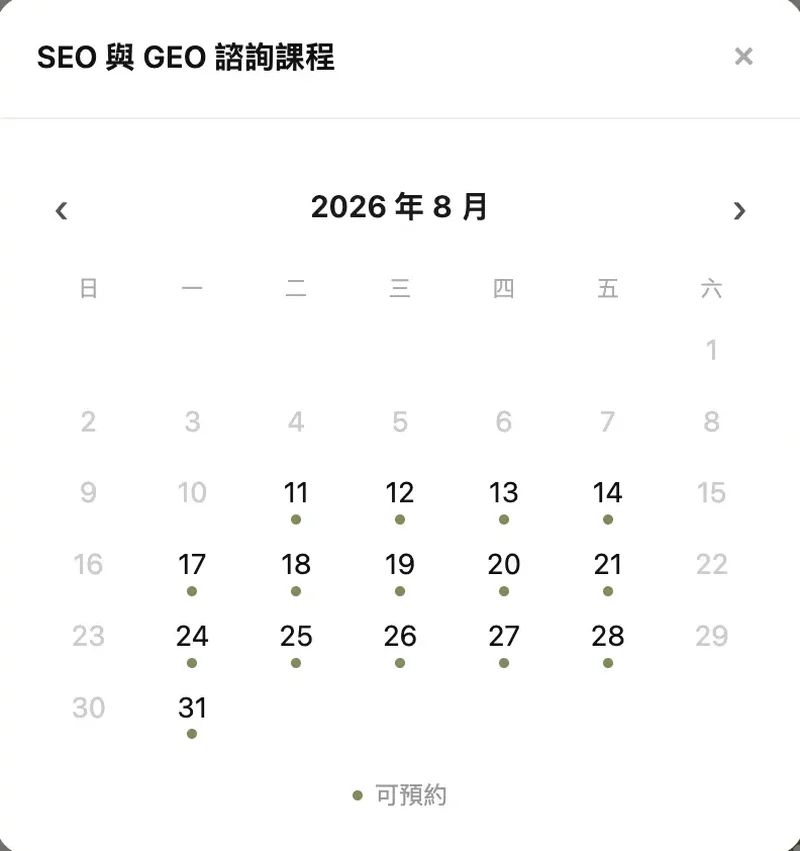
Choose a date
Dates with open slots are marked as bookable; selecting one moves on to the time slot and details form.
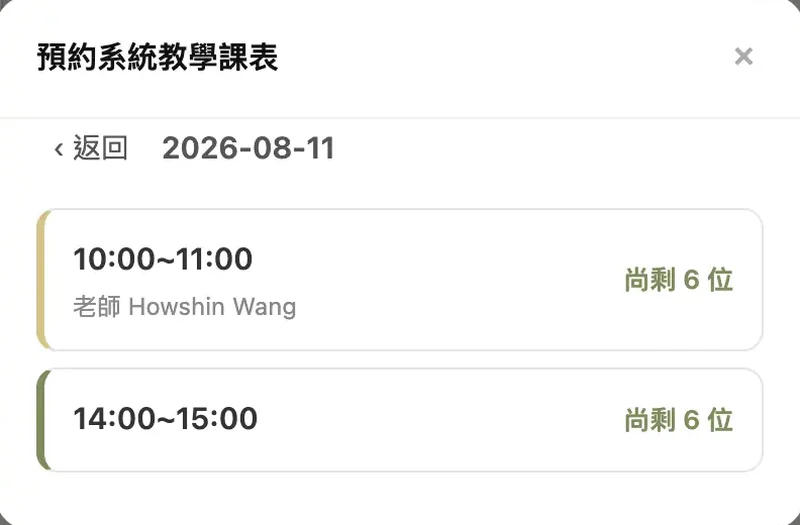
Sign up from the schedule
Each session shows the instructor and remaining places, and closes automatically when full. Students pick a single session from the schedule and take a place.
You can use booking on its own, without building a website
AHHA is an integrated platform: booking, membership and your website share one dashboard. But most people who arrive searching for a booking system want a tool that replaces the back-and-forth of confirming times over chat — not necessarily a website.
So, to be clear about scope: you can use only the booking features. After signing up, create your services and set opening hours or a class schedule, and you get a public booking URL; none of the website settings need to be dealt with. The dashboard sidebar collapses to the modules you actually use, so features you have not enabled stay out of the way.
If you want a website later, the features are already there, and the services, instructors and packages you have created are the website's content — pick a template and the first version of the pages is generated from them.
One-to-one bookings and group classes side by side
Weekly recurring hours
Set the weekly window and session length (for example Monday to Friday 9:00–18:00, 60 minutes each) and let customers choose. Suited to beauty, counselling, photography and pet grooming.
Scheduled classes
Set each session's time, instructor and capacity on the schedule, and students book a single session and take a place. Suited to yoga, fitness, baking and group classes generally. Both modes can run on the same site, set per service.
Week-view schedule
A seven-day grid where each session shows the instructor's colour and remaining places. A whole week can be copied forward in bulk rather than rebuilt week by week. Cancellations are handled by changing status, and existing bookings are kept intact.
Booking rules
A buffer can be blocked automatically after each session for cleaning and setup. A cancellation deadline can be set a number of hours before the start, after which customers can no longer change it themselves, reducing the impact of last-minute cancellations.
Package deduction and instructor payouts
Class cards and point cards
Both session cards (buy 10, deduct 10) and point cards (one card across services, each service deducting a different number of points) are supported. The system deducts from whichever expires soonest. Members can check their remaining sessions, and cancellations return them automatically.
Deposits
You can require a transferred deposit before a booking is confirmed, which lowers no-show rates. After submitting, the customer receives a confirmation email with the bank details; once you reconcile it the booking confirms automatically, and it cancels if payment does not arrive in time. The amount is set per service.
Payment method records
The system does not collect payment; it records the method. Customers choose cash, ATM transfer, LINE Pay, JKOPay or card at booking, and you collect through your own channels, with funds going straight to your account. Customers who choose ATM receive the account details on the completion page and in the confirmation email. Payment status is separate from the booking itself, so you can collect after the session and mark it settled once received.
Instructor payout reports
Each instructor can be set to a fixed amount per session, a percentage of revenue, or a per-head calculation. The system settles the amount due from the sessions actually held and exports revenue, payouts, margin and CSV. The basis can be switched between people booked and people who actually attended.
Sign-up, attendance and settlement as one record
Attendance check-off
Each session has a register you can open and mark each person present or absent, with counts for booked, attended and absent. Attendance also feeds the payout report.
Multiple places per booking
A single booking can reserve several places, with capacity and package deduction calculated by headcount, so there is no need to split it into separate bookings.
Member records and booking history
Customers sign in with Google or LINE, their details are pre-filled, and they can review upcoming and past bookings and remaining sessions. On your side, each customer's full history is visible, with tags and notes you can add.
Automatic notifications
Booking placed, confirmed by you, reminders before the session and cancellations are all sent by both email and LINE, so there is no need to confirm message by message.
Three ways in — use one or run them together
LINE official account menu
The dashboard provides a visual editor for the bottom menu of your LINE official account. Customers tap through and complete the whole booking inside LINE without switching to a browser, and check “my bookings” there too.
Standalone booking URL
Works without LINE. The system provides a public booking page URL you can put in an Instagram bio, a Google Business Profile, a business card or a group announcement. Customers sign in with Google and book.
Embedded in your site
If you are also using the website, the booking block embeds directly into a page so customers never jump to another platform. The structured data search engines and AI retrieval need — service name, duration and price — is generated automatically.
The website is included, and can be left unused for now
The same account already includes a website, with multilingual support, a blog, and the structured data search engines and AI retrieval need generated automatically. If you only need booking for now, the website settings will not get in your way: the dashboard sidebar collapses to the modules you actually use, and features you have not enabled are not shown. If you want the website later, the services, instructors and packages you have already created are the website's content — pick a template and the first version of the pages is generated, rather than starting from a blank page.
Booking features are in every plan
Not billed per booking, nor per member. Scheduling, class cards, deposits, attendance check-off and payout reports are all part of the base plan.
Studio
NT$5,999 / 年
Full booking system and website. Promotional price through the end of 2026 (regular NT$7,999)
Pro
NT$12,999 / 年
Adds AI features and multi-branch management
Questions people ask before getting started
Q.Can I use the booking system without a website?
Yes. After signing up, create your services and set opening hours or a class schedule, and the system provides a public booking URL you can put on Instagram, LINE or your Google Business Profile. The website is included in the plan but does not need to be dealt with — the dashboard collapses the features you are not using.
Q.Can one-to-one services and group classes run at the same time?
Yes. Scheduling is set per service: personal sessions use weekly recurring hours so customers pick their own time, and group classes use the scheduled mode where you set the timetable for students to book. Both run on the same account, and customers see both on the same booking page.
Q.How do I set things up with several instructors?
Create each instructor in instructor management (photo, bio, colour) and assign the instructor when scheduling each session. The schedule is colour-coded, and the payout report settles each instructor according to their own rule. Customers can see who is teaching each session on the booking page.
Q.Can customers pay by card online?
Not at the moment — the system does not integrate an online payment gateway. What it provides is payment-method recording: the customer chooses cash, ATM, LINE Pay, JKOPay or card at booking, and you mark it settled in the dashboard once collected. Customers who choose ATM receive the bank details automatically. Funds go straight to your account; the platform neither handles them nor takes a cut.
Q.What is the difference between class cards and point cards?
A session card is tied to a specific service — buy 10 and it deducts 10 uses of that service. A point card is a single card usable across services, with each service able to deduct a different number of points (a group class 1 point, a private session 3, for example). Both can run together: the system deducts from the session card first, then points, and always from whichever expires soonest.
Q.Do customers need to download an app or add me on LINE?
Neither. Customers open the booking URL, sign in with Google, and can book and review their history. If you already have a LINE official account, booking can also be placed in the LINE menu for customers who have added you — an additional entry point, not a requirement.
Q.How is pricing calculated?
The base plan, Studio, is NT$5,999 per year (promotional through the end of 2026; regular NT$7,999) and includes every booking-related feature, with no additional charge per booking or per member. Pro is NT$12,999 per year and adds AI site-wide translation, AI support chat, AI crawler insights and multi-branch management. A 14-day free trial is available with no credit card required.
Q.Can I export the data?
Yes. Member lists, booking records and payout reports all support CSV export.